Dota Replay Manager 2.05 Latest Release – This is the definitive version of the utility, refined through extensive community feedback to provide robust player statistics, advanced replay searching, auto-copy functionality, and an integrated replay browser. Having used this tool extensively for analyzing competitive match history and individual performance metrics, I can confirm that this release addresses several stability issues and enhances data parsing accuracy. Download link is provided at the end of this article.
Overview of Program Features:
Replay Parsing Capabilities:
I have included pre-parsed data for many maps. However, if you attempt to open a replay for which the map data is missing, the program will prompt you for an action:
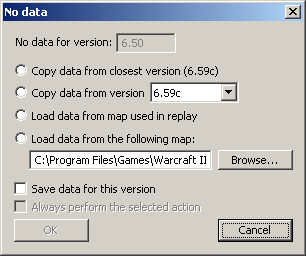
For the best experience, I recommend selecting "Load data from map used in replay" and checking both save boxes to maintain a clean, efficient database.
Screen Shots


Changelog
Download link:
Dota Replay Manager 2.05
Overview of Program Features:
- Explorer-like replay browser (tree view + list view) with standard file management: copy/paste, drag-and-drop, delete, rename, and folder creation.
- Auto-copying of new replays (monitors LastReplay.w3g) and batch processing for large libraries.
- Advanced replay search parameters: filter by game name, duration, map version, specific player names, and selected heroes.
- Network integration: capable of loading replays directly from the internet if the filename starts with https:
- Player statistics: access detailed profiles by typing "Player:PLAYER_NAME_HERE" in the path bar.
- Experimental game lobby screenshot analysis (note: reliability varies; currently under review for future updates).
- Hero-centric organization: view and sort replays by hero usage.
Replay Parsing Capabilities:
- Native DotA data integration: The program extracts data directly from the map file. If specific metadata is missing, you will be prompted to supply the corresponding map file to ensure accurate parsing.
- Comprehensive game metadata: Displays date, patch version, map, game name, host, saver, duration, player roster, scores, winner, and observer lists.
- Detailed player breakdown: Includes level, build cost, stats, lane assignment, APM (actions per minute), and exact leave time.
- Multi-language support: Features a colored chat view; successfully tested with Russian character sets.
- Timeline view: Provides a visual, animated representation of hero movement throughout the match.
- Hero builds: Tracks skill progression and item acquisition.
- Action charts: Visualizes action types, hotkey usage, and APM fluctuations over the course of the game.
- Economic graphs: Timeline tracking for both gold and experience gain.
- Presentation tab: Export replay data into plain text, forum BB codes, or HTML for easy sharing on community forums.
- Draft analysis: Displays -cd (Captain's Draft) pools and ban/pick phases for -cd/-cm modes.
- Action log: A granular, graphical log designed for competitive analysis and TDA RA requirements.
I have included pre-parsed data for many maps. However, if you attempt to open a replay for which the map data is missing, the program will prompt you for an action:

- "Copy data": Duplicates data from a similar version. This is a fallback method; for example, if you lack data for 6.38, you may use 6.38b data as a proxy, assuming high compatibility.
- "Load data": Parses the map file directly, which may take several seconds. "Load data from map used in replay" is the recommended setting; ensure the map file resides in your Warcraft III maps directory.
- "Save data for this version": Persists the parsed data for future use. I recommend checking this box to avoid redundant parsing.
- "Always perform the selected action": Automates your choice for future map mismatches. Use with caution, as this setting is persistent.
For the best experience, I recommend selecting "Load data from map used in replay" and checking both save boxes to maintain a clean, efficient database.
Screen Shots


Changelog
- Fixed chat log search to be case insensitive.
- Added search functionality for the Action Log.
- Added right-click menu for Action Log to facilitate line copying.
- Fixed "Copy name" bug in the game info tab.
- Added assists to "Copy stats" function.
- Added "Copy matchup" button for quick roster/hero sharing.
- General stability improvements and crash fixes.
- Fixed integer overflow errors in the gold timeline.
- Implemented drag-and-drop support for folder views.
- Improved draft view for -cm mode (Note: DotA game engine limitations currently restrict -cd to Sentinel picks/bans).
- Added kill streaks and combos to chat and timeline; use "Chat Filters" to toggle visibility.
- Enhanced -switch mode support; corrected player color and teammate kill reporting.
- Improved Blink Dagger ward-placement logic in the timeline view (temporary fix; requires more data for full resolution).
- Added assists to game chat (optional via Settings; note that DotA's internal storage of this data is occasionally inconsistent).
- Removed 8192 size limit on cache; gamecache now uses date/time as a unique key to prevent duplicates. If you experience issues, delete the cache file and re-index.
- Fixed hero chart accuracy.
- Added game mode filter to hero chart (suggested by tk1).
- Updated Timeline view: buildings now correctly disappear upon destruction, and the map image is updated to the latest version.
- Fixed time-mark display errors in graphs (e.g., -0:58 to -1:00).
- Added PlayDota smiley tags for items.
Download link:
Dota Replay Manager 2.05